This is a transcript of my talk at the AI Coding Summit on February 26, 2026. Watch the video on GitNation.

Hi, I'm Todd Schiller, co-founder of PixieBrix. Today I'm going to be talking through some of the hard-won lessons that we've learned using AI to code an AI-enabled extension that's used globally by enterprises.
Browser Extensions Enable Permissionless Innovation

Our mission has always been to empower people to create the perfect experience for the technology that matters most to them. Our first product was a browser extension because browser extensions enable permissionless innovation. You can automate and modernize sites that you don't yourself control — whether those are third-party websites, vendor websites, or government websites. You can also automate and integrate across tabs. We fundamentally believe that browser extensions are a key part of how you empower the people closest to the work to customize their tools to the job.
Browser Extensibility Is a Spectrum

Browser extensibility is in fact a spectrum. There are multiple different ways to customize the standard browser experience.
In the past year, we've even seen many different forks of the Chromium browser for things like security or embedding AI capabilities directly into the browser. Then you have the standard custom extension experience that most people are familiar with — you go to the Chrome Web Store, you get an extension, it does something.
Then you have a category of extensions that enable people to customize in different ways. Userscripts like Greasemonkey or Tampermonkey allow you to run JavaScript in the context of a web page. PixieBrix is a different kind — you can think of it like userscripts but more low-code or no-code, enabling a broader audience to customize.
Each of these comes with different trade-offs. The things on the right side of the screen are generally more lightweight and more agile, but that comes with trade-offs of less control, fewer affordances, and more restrictions versus, for example, creating a custom extension or building your entire browser yourself.
AI Coding Tools Aren't Designed for Browser Extension SDLC
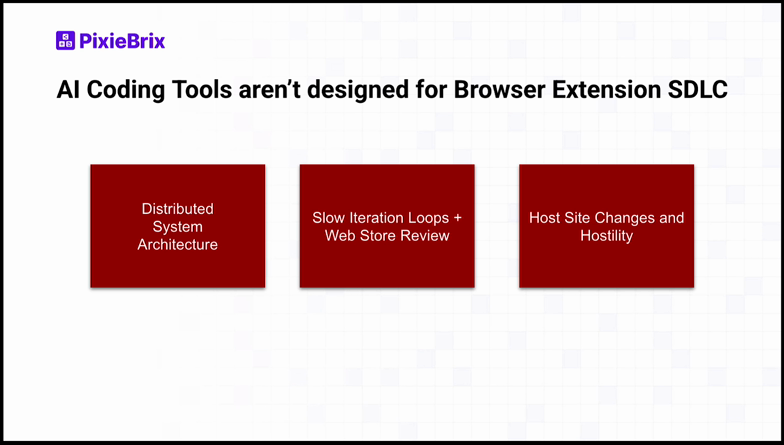
As we've started applying AI coding tools like Claude and Cursor to the problem of browser extensions, we found three main gaps in how those tools treat the software development lifecycle:
- Distributed System Architecture: Browser extensions are actually distributed systems, even though at first glance they might look like applications.
- Slow Iteration Loops + Web Store Review: Because of the web store structure and how extensions are distributed, they have slower iteration loops than many tools designed for web applications.
- Host Site Changes and Hostility: Extensions often need to work in the context of host sites that change or might be outwardly hostile to your extension.
These challenges are surmountable. You just have to think through how to best handle them and how to best apply AI coding tools.
Browser Extensions Are Distributed Systems in a Box
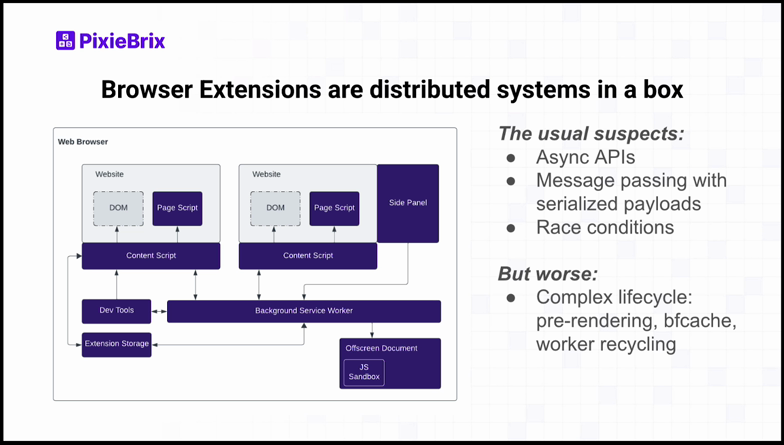
For people who aren't familiar with how browser extensions work under the hood, I like to describe them as a distributed system in a box.
A browser has multiple different tabs, each tab has multiple different frames, and your browser extension is injecting content scripts onto each of those. But then you also have surface areas like the side panel, as well as things working behind the scenes — storage, the service worker, offscreen documents. A lot of different pieces are talking to each other.
You run into the usual suspects of distributed systems problems: everything is async, you're doing message passing with serialized payloads, and you hit race conditions. But in some ways, it's worse than a normal distributed system. Some of these components have very complex lifecycles — tab pre-rendering, backward/forward cache, worker recycling. It's a different animal even compared to normal distributed systems.
Best Practice #1: Choose the Right Base Foundation

The first best practice is choosing the right base foundation. I don't believe most people should have to worry about the distributed systems issues I showed on the last slide. You want to choose a foundation where you can be the most productive.
In our case, we started at the library layer — we use different libraries to smooth over quirks in the browser extension APIs for better ergonomics. But if you're building an extension for a single, common use case, you might consider using a framework like WXT, Plasmo, or CRXJS to build it quickly. If you don't want to worry about CI/CD or preview builds, you might use a platform like Plasmo or Shipper that handles builds automatically or even submits to the Chrome Web Store on your behalf.
On the other side, if you're building on top of extensions, the question is whether you want to be in the userscript world with Greasemonkey or Tampermonkey, or build on a low-code platform like PixieBrix that gives you higher abstractions for integrations, compliance, and component libraries.
Best Practice #2: Maximize the "Boring" Part of the App
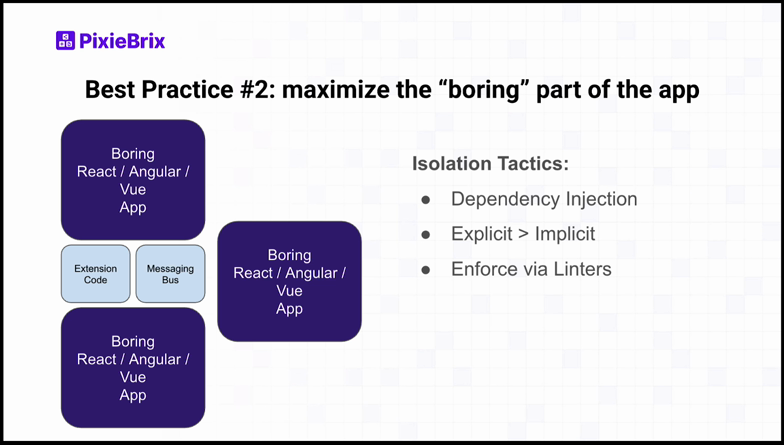
Once you've chosen your foundation, the name of the game is maximizing the boring part of the application. Browser extensions can be built with standard frameworks like React, Angular, or Vue. What you want to do is create a big area of those boring applications, and then encapsulate the extension-specific code — the code that uses extension APIs, the messaging bus, etc.
Use the standard isolation tactics:
- Dependency Injection: Separate extension-specific code from standard application logic.
- Explicit > Implicit: When using AI, it's always better to be explicit than implicit. This helps the AI have better local context for how a particular piece of code is working.
- Enforce via Linters: Enforce these boundaries using linters or other tools to give instantaneous feedback.
Best Practice #3: Create Fast Feedback Loops
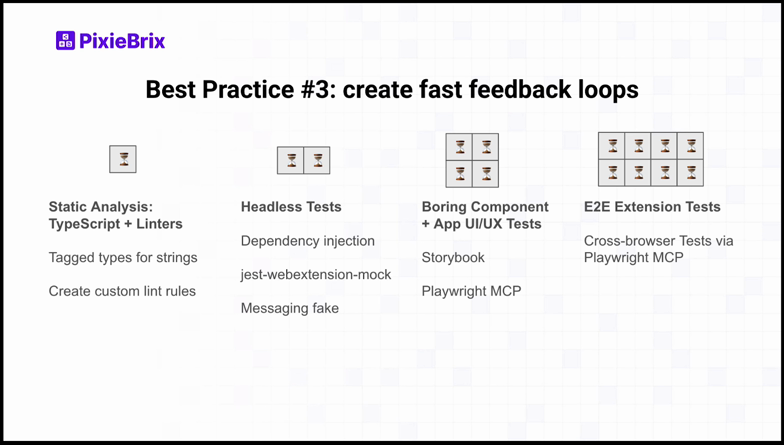
Creating fast feedback loops is critical in the browser extension world. From fastest to slowest:
Static Analysis: TypeScript + Linters — Use TypeScript with type definitions for the different browsers. We use tagged types for strings to differentiate values. We also use lint rules extensively and use AI to create custom lint rules. Whenever a bug comes in, we ask ourselves: was this a preventable bug, could we have caught it earlier? Then we write a lint rule for it.
Headless Tests — Take advantage of dependency injection, use mocks and fakes like jest-webextension-mock and messaging fakes to do integration tests in a realistic way.
Boring Component + App UI/UX Tests — Use Storybook and standard Playwright MCP for the vanilla application components.
E2E Extension Tests — Cross-browser tests via Playwright MCP. These take longer, especially across multiple browser types and versions. We also test against Canary. Some things that Playwright can't test, we use browser-use tools like Reinforced QA.
Always shift left — catch things earlier rather than relying on slower feedback loops.
Best Practice #4: Create Test Pages for Host Page Quirks

Extensions often modify a host page. It's not a good idea to run your automated tests or do your QA against those host pages all the time because it's slow, flaky, and in some cases they'll catch your robotic behavior. So we create test pages for the different patterns we come across.
Common quirks include:
- Host Style Conflicts: Even with Shadow DOM, some styles can leak through. We have a page with very extreme styles so we can see which ones come through to our extension.
- Forms + Rich Text Editors: These have their own interaction models that extensions need to handle.
- Single Page Application navigation events: SPAs don't trigger standard page loads, which affects extension behavior.
Whenever you have a bug, create a test page for it. Then it's in your repertoire of regression tests. Definitely use AI to generate those test pages.
Recap
To recap, set your AI coding tools up for success:
- Choose the right foundation
- Maximize the boring part of the app
- Create fast feedback loops
- Create test pages for host page quirks
That's going to give you stability and testing in your agentic loop.
Enterprise-Grade Is More Than Code
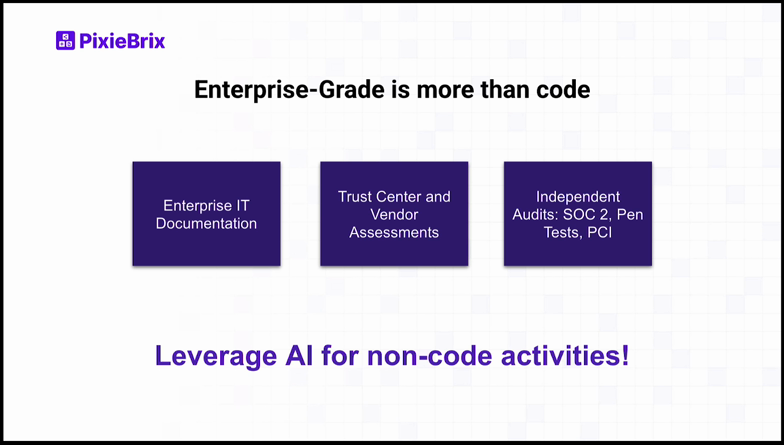
Enterprise-grade is more than just code. You can generate all the code in the world, but if you don't have the right enterprise IT documentation, the right trust center, the right audits in place, you're not going to get traction in the enterprise — especially with browser extensions. Go do those things and definitely leverage AI for those non-code activities.

As you're thinking about which foundation you want to build on, take a look at PixieBrix. We are the only enterprise-grade platform enabling end-user AI coding. Start for free and check out our workshop to get hands-on experience building with the PixieBrix platform.